Edit PDF text online, in the same font
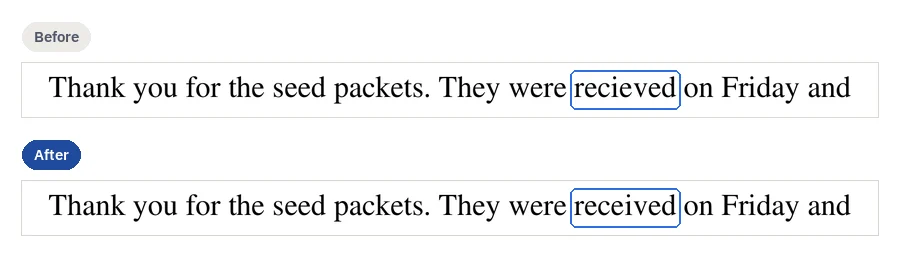
To edit the text in a PDF online, open it, click the word, type the new one and download the result. CECO PDF sets it in the same font the document uses, in a digital PDF or a scan, and checks that nothing else on the page changed. It refuses a correction it cannot match.
Open a PDF to edit its text — it opens the tool, with nothing to install.
- What it does: changes words already on the page, such as a typo or a misspelt name, in the font the page uses, with no conversion to Word.
- The check: the page is compared before and after, pixel by pixel, and the file cannot be downloaded until nothing outside the corrected words has changed.
- The price: Correcting is free to try, 10 corrections a day. Until it is paid for, the corrected pages show with a watermark, unless you are signed in and have not yet taken your first corrected download of the day; the file you download does not carry it. Signed in, your first corrected download each day costs nothing; after it, one takes a credit or a plan. One document costs €0.99, and a pack of 10 costs €4.99. One document can be bought without an account.
Your PDF is kept with your documents and deleted after 90 days, or whenever you delete it; the privacy notice says what is kept, and why. Correct only documents that are yours, or that you are entitled to alter: the terms say who may. Identity documents are refused when they are uploaded.
How do I change the text in a digital PDF?
A PDF saved from a word processor usually holds its words as real text. To change one:
- Open the PDF. Press the button above, or “Try a sample document” to try one the app provides.
- Click the word, or drag a box around the words. The field under it fills in with what the page says now.
- Type what it should say. Nothing on the page changes yet.
- Press “Make this change”. The new words are typed into the page's own text, in its own font, and stay selectable and searchable.
- Read the check, then download. The result shows the words before and after, and the pixels changed outside them: outside 0 px, or no download.
Can I edit the text in a scanned PDF?
Yes. A scan is a picture of paper, with no text to type into, so CECO PDF changes the picture itself: letters taken out by moving the page's own marks, new letters drawn to match the type beside them. Editing a scanned PDF says what it can and cannot do there.
How do I edit a PDF and keep the same font?
On a page of real text, the new words are set in the font the PDF already carries. Many PDFs carry only the letters they use, so a letter the document never printed may be missing. Then the correction is refused, and the message names the letter: “This page's font does not have one of the characters you typed.” It is never set in another font, or printed as an empty box.
On a scan, the line's letters are compared with the typefaces CECO PDF can draw, by drawing each and comparing it with the page, and new letters are drawn in the closest face only when the match is confident. Otherwise the correction is refused: “The font on this line could not be recognised.” Drawn letters that would come out sharper than the scan around them are refused too.
The result says which of four things it did: “Typed into the text”, “Made from the page’s own marks”, “Matched to the letters around it” (new ink, drawn to match) or “Paragraph set again” (words you did not correct moved).
Can I change the font in a PDF?
Not of words already on the page: a correction keeps the font they are set in, which is what lets a changed word sit in its line. To type new words in a font and size you choose, add a text box; one that would cover the page's own words is refused.
How can I check that nothing else changed?
Every correction declares the part of the page it may change. Afterwards the page is drawn before and after, at 300 dots per inch for a scan and 150 for a page of real text, which has no grain to hide a change in, and compared pixel by pixel. It is verified only if no pixel outside that part changed, shown as outside 0 px; until then the file cannot be downloaded.
- Look for yourself. “Look closely” shows the corrected place magnified, before and after, and holding B puts the original back.
- The record inside the file. An attachment named
provenance.jsonlists every correction: where it was made, how, the words before and after, and when. - A certificate. With a Business plan you can issue a certificate for a corrected document, signed so that whoever you hand it to can check it at the certificate check, without an account.
- Measured results. The measured results show how well corrections hold up to forensic detectors, on invented scans.
- Any two versions. Compare PDF shows every place two PDFs differ, whichever tool changed them.
How do I fix a typo or correct the spelling in a PDF?
Click the word, type it as it should be, and apply: a doubled letter, a missing one, two swapped, or a misspelt name in your own letter or form. Taking a letter out needs no new ink: the rest of the word moves across. CECO PDF does not hunt for mistakes for you: you point at each one.
What are the other ways to edit PDF text, and when are they fine?
Each is the right one for some jobs. This is what each maker says on its own pages, read on 29 October 2026:
| Way | What it does | Fine for |
|---|---|---|
| Adobe Acrobat Pro1 | Adobe's free online editor “does not let you edit existing body text within a PDF”; to “edit or reflow existing text, fix typos, or change fonts”, Adobe points to Acrobat Pro, which “offers a 7-day free trial”. | Rewriting paragraphs, and many changes at once |
| A Word round trip2, 3 | “Word makes a copy of the PDF, converting it to a Word document and attempting to match layout of the original PDF”, Microsoft says. PDF24's tip is the same: “Convert a PDF to Word to edit the text.” | A document you will go on editing; Microsoft says “Converting from PDF to Word works best with files that are mostly text” |
| A white box and a text box4, 5 | Covers the old words and types new ones on top. Sejda says its whiteout “hides but will not completely remove underlying text or images”; Smallpdf rates white-out's security “Low”. | A quick change to a draft on plain white paper |
| An online editor for digital text4, 6, 7 | Sejda: “Click any existing text to start editing”, and if the font lacks a letter, “Choose a replacement font”. iLovePDF: “Select text to edit, move, or delete the existing content”. At Smallpdf, “Direct PDF text editing requires a Pro subscription”. | Several changes to a digital PDF, where a nearby font will do |
| CECO PDF | Changes the words where they are, checks the page, and records the change in the file. | A wrong word, date or figure in a page that must otherwise stay as it was |
What the other ways do better: many changes, or whole paragraphs, are quicker in Acrobat Pro, an online editor or Word. Sejda's online editor is a “Free service for documents up to 200 pages or 50 MB and 3 tasks per hour”4. CECO PDF makes one correction at a time. To add a text box, an image or a highlight rather than change a word, editing a PDF lays them over the page.
Why can't I edit the text in my PDF?
- It asks for a password. Open your own protected file with its password: it is asked for at upload, and the corrected copy comes back without one. Protect PDF adds one again, and Unlock PDF takes off a password you know.
- It is signed. Editing a signed PDF breaks the signature; correct it, then sign it again.
- The words are in form fields. They are the fields' answers, not the page's text: change them with Fill & sign.
- The letters are drawn as outlines. The page holds shapes, not text, and the app says so: “This page is line artwork and carries no text to correct.”
- It is a scan. Its words are ink in a picture, which editing a scanned PDF explains.
Can I edit PDF text online, in any browser?
Yes. CECO PDF is a PDF text editor that runs in the browser of a computer, a tablet or a phone, Linux and a Chromebook among them, with nothing to install. What each device's own apps can do is set beside it for a Mac, Windows, an iPhone or iPad and Android.
Can anyone tell the text was changed?
Nothing outside the corrected words changes: that is what the check proves. On a scan, drawn letters are new ink, a removal can leave a faint trace inside the corrected place, and someone comparing the patch closely with the rest of the page could tell; the measured results show how readily forensic detectors find them. And the change is never hidden: every correction is recorded inside the file, with the words before and after, and carries your confirmation that you may alter the document.
Questions people ask
Can I edit the text in a PDF for free?
You can correct a document and see the result before you pay: 10 corrections a day. Signed in, your first corrected download each day costs nothing; after it, one takes a credit or a plan. One document costs €0.99; the pricing page lists the rest. One document can be bought without an account.
Can I edit a PDF without changing its layout, or converting it to Word?
Yes. CECO PDF changes the words in the PDF itself, in the browser, and leaves the rest of the page as it was. Converting to Word rebuilds the page, and Microsoft warns that “it might not look exactly the way it looked as a PDF”2.
Can I replace a word everywhere at once?
No. There is no replace-all: each place a word appears is its own correction, made where you point and checked on its own, so none can land where you did not look.
What happens if the new words are longer?
On a page of real text the rest of the line moves along. A replacement that would run past the paragraph's edge is refused, because re-breaking the paragraph moves lines nobody edited; shorten it, or select the whole paragraph and accept that it is set again.
Can I edit a PDF on my phone?
Yes, in its browser: tap the word, or press “Select an area” and run a finger over the words. Without a credit or a plan, files of up to 15 MB and 50 pages are taken. Editing a PDF on an iPhone or iPad and on an Android phone go through it.
Is it safe to upload my PDF?
Your file is deleted after 90 days, or whenever you delete it, without asking anyone, and no part of it is kept for any other purpose unless you choose to report a region of it. The privacy notice says the rest.
Can I edit a PDF someone else sent me?
Only if you are entitled to alter it, as the terms say. CECO PDF cannot judge that, so it records instead, and every correction carries your confirmation that you may make it.
Related pages
- Edit a scanned PDF, for a scan
- Change a date in a PDF, for a date or a figure typed wrong
- Remove text from PDF, to take words out
- How it works, for how a correction is checked
- Fill PDF, for a form's fields
- Edit PDF, to add text boxes, images, shapes, highlights and notes
- PDF editors compared, beside Acrobat, Foxit and others
Sources
Each page below was read on 29 October 2026, on its maker's own website; a number beside a quotation leads to its page. Check a price or a limit there before you rely on it.
- Adobe: Acrobat online: free PDF editor. www.adobe.com/acrobat/online/pdf-editor.html
- Microsoft: Opening PDFs in Word. support.microsoft.com/en-us/word/opening-pdfs-in-word
- PDF24: Edit PDF. tools.pdf24.org/en/edit-pdf
- Sejda: Online PDF editor. www.sejda.com/pdf-editor
- Smallpdf: PDF white out: erase text or images from a PDF. smallpdf.com/blog/pdf-white-out
- iLovePDF: Edit PDF. www.ilovepdf.com/edit-pdf
- Smallpdf: Edit PDF. smallpdf.com/edit-pdf
Last updated