Redact a PDF
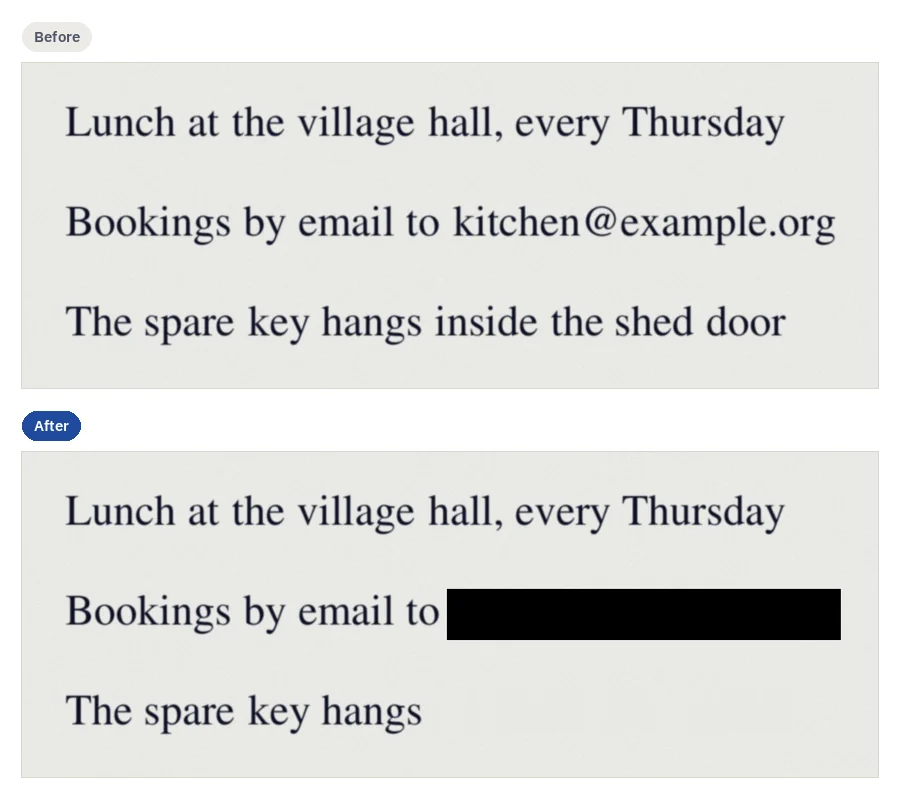
To redact a PDF, open it in Redact PDF, draw a box over what must go, or find a word or a pattern and tick each match, then press “Redact”. CECO PDF takes it out of the file, checks that it is gone, and names any other place the words stand. It refuses to remove signatures, seals and watermarks.
Open a PDF to redact — it opens the tool, with nothing to install.
- What it does: takes words, areas and images out of the file, and draws a black box, a white box or a label in a black box where they were.
- The check: before the redacted file is kept, it is searched for what was removed, and if anything is found, nothing is changed.
- The price: Redaction is priced as a correction. Redacting is free to try, and each request counts as one correction of the day's 10. Downloading the redacted document is priced as a corrected document is. One document costs €0.99. One document can be bought without an account.
Your PDF is kept with your documents and deleted after 90 days, or whenever you delete it; the privacy notice says what is kept, and why. Redact only documents that are yours, or that you are entitled to alter: the terms say who may. Identity documents are refused when they are uploaded.
What is redaction, and why is a black box not enough?
Redaction takes words, areas or pictures out of a document before it is shared, and marks where they were. A black box drawn over the words is not that: the words stay in the file underneath, for anyone to copy or find. Sejda's own page says its whiteout “Whiteout hides but will not completely remove underlying text or images.”5 and is “Not suitable for redacting sensitive data”. Smallpdf's redaction page puts it plainly: “Unlike simply covering text with a black box, true redaction completely eliminates the data from your document.”1
It goes wrong in public. On 8 January 2019 a filing in a closely followed criminal case in the United States was published with passages blacked out, and the boxes hid nothing. The Atlanta Journal-Constitution reported that each blacked-out section “can easily be unmasked, simply by highlighting the blacked out portions of text”6, and that the filing “allowed people to copy and paste the information into another text document, where the information could easily be read”. A study of PDF redaction found the same in the wild: “We also effectively deredact hundreds of real-world PDF redactions”7.
How do I redact a PDF?
- Open the PDF. Press the button above and choose your file.
- Draw a region, or find what to remove. Drag a box over the page; or, under “Find what to remove”, type a word of at least three characters, or choose under “Or a pattern”: email addresses, phone numbers, IBANs, card numbers, dates or numbers.
- Tick each match. Every match is listed with its page, and nothing is removed until you tick it; “Tick all shown” ticks the list when you press it. There is no redact-all.
- Choose the mark under “Mark where content is removed”: a black box, a white box or a label in a black box, the label up to 40 characters.
- Press “Redact”, then download. The result says what was removed, and a region it would not touch is “Left as it was”, with the reason. Then press “Download the redacted PDF”.
How do I know it is gone?
Before the redacted file is kept, it is read back and searched: its text, the pictures under each region, every stream and object of the file in each form a PDF stores text in, and, where the server can read pages, a reading of the page as it renders. Every pixel outside the regions is compared with the page before, and every other page must draw what it drew. If a check fails, nothing is changed, and the result says so. Where the same words also stand elsewhere in the file, in its title, bookmarks, notes, fields, links or attachments, the result counts them.
The record inside the file, an attachment named provenance.json, then lists each
redaction: its pages and regions, how many runs of text, images and drawings went, and the mark
drawn. It never quotes what was removed, and neither does any certificate issued for the
document. To check for yourself, search the downloaded PDF for the word in any reader.
What does it never remove?
A region that holds a watermark, a Bates number, a signature or initials, a seal or stamp, microprint and a guilloche pattern (fine security line art) is refused, and the result names what it found; a PDF that carries a digital signature is refused whole. Removing those is how a document is disguised or falsified, so it is not done here for anyone. Draw the region round it instead.
What should I know before I rely on it?
- A box keeps the shape of what it covered. The words around a region stay where they were, so the box shows how long the removed words were. A study of PDF redaction warns: “Unfortunately these findings affect redactions where the text underneath the black box is removed from the PDF.”7 When even the length of a name would tell someone something, redact the whole line.
- Your upload stays here until you delete it. The version before a redaction is kept, so that undo can bring it back. Delete the document once you have the redacted copy; otherwise it is deleted after 90 days.
Can I redact a PDF on an iPhone, a Mac or without Adobe Pro?
Yes, in the browser, with nothing to install. On a touch screen, press “Select an area” and drag a finger over the page to draw a region. Nothing from Adobe is needed, where Adobe's plans page lists “Redact sensitive content” for Acrobat Pro and Studio only.
Questions people ask
Can I redact a PDF for free?
Redacting is free to try: each request counts as one correction of the day's 10. Until it is paid for, the redacted pages may show with a watermark; the file you download does not carry it. Downloading the redacted document is priced as a corrected document is. The pricing page lists the plans. Smallpdf says “Yes! You can redact PDFs for free.”1
Can I redact a PDF in Preview on a Mac?
Yes. Apple's guide describes Preview's Redaction Selection tool: “Select text to remove it from view.”2 It adds: “You can change the redaction as you edit, but once you close the document, the redaction becomes permanent.”
Can I redact a PDF in Adobe Reader or Acrobat?
In Acrobat Pro. Adobe's plans page lists Reader under “Basic PDF tools”3, and “Redact sensitive content” for Acrobat Pro and Studio, not for Standard.
Can I redact a PDF in Google Docs?
Google's help describes opening a PDF in Google Docs as a conversion: “The image file is converted, but the format might not transfer”4. That makes a new document, and the page says nothing of redaction.
Can I redact a PDF that has been signed?
Not here: redacting changes the document, so the signature no longer holds. Editing a signed PDF breaks the signature. A PDF that carries a digital signature is refused whole: redact a copy that has not been signed, then have it signed again.
Can I redact a scanned PDF?
Yes. On a scan the region's pixels are overwritten in the stored picture, and a white box fills it with paper matched to the paper around it. Finding words on a scan reads it with OCR, so draw a region over anything the matches missed.
Can I undo a redaction?
Here, yes: the version before it is kept with the document, and undo counts as half a correction against the day's allowance. In the file you download, no: what was removed is not in it.
Related pages
- Remove text from PDF, to delete words so that a page reads as if they had never been there
- Edit PDF, to add text boxes, images, highlights and notes
- Protect PDF, to give the redacted copy a password
- Compare PDF, to see every place the redacted copy differs
Sources
Each page below was read on the website that publishes it, on the day given beside it; a number beside a quotation leads to its page. Check a price or a limit there before you rely on it.
- Smallpdf: Redact PDF: remove sensitive information permanently. smallpdf.com/redact-pdf, read on 5 November 2026
- Apple: Annotate a PDF in Preview on Mac. support.apple.com/en-gb/guide/preview/prvw11580/mac, read on 5 November 2026
- Adobe: Acrobat plans and pricing. www.adobe.com/acrobat/pricing.html, read on 6 November 2026
- Google: Convert PDF and photo files to text, in Google Drive Help. support.google.com/drive/answer/176692, read on 5 November 2026
- Sejda: Online PDF editor. www.sejda.com/pdf-editor, read on 5 November 2026
- The Atlanta Journal-Constitution: Report of a legal filing whose redactions could be copied out. www.ajc.com/blog/jamie-dupree/manafort-legal-team-botches-redactions-reveals-campaign-contacts-with-russian/iyGwxLTb04zd3cnxzb4MOL/, read on 5 November 2026
- arXiv: Story Beyond the Eye: Glyph Positions Break PDF Text Redaction, a study of PDF redaction. arxiv.org/abs/2206.02285, read on 5 November 2026
Last updated