Measured results: how well corrections hold up
Every correction CECO PDF makes is checked pixel by pixel, and that check says nothing about how easy the correction is to find afterwards. This page does. It publishes what our own forensic detectors and one reviewer found when they went looking, on invented pages built for the purpose, with the weak rows left in. Every number here is generated from the benchmark's committed results; none is typed.
The benchmark's numbers were committed on 24 September 2026; the blind review's on 21 September 2026. Engine version 0.1.1.
What is measured
The benchmark builds 200 invented pages: letters, statements and forms written for the purpose, with no real names, addresses or figures on them. Each is then scanned in software the way a real page would be, under four conditions:
- Phone camera. A page photographed with a phone: uneven light, a little skew, the sensor's noise, and the JPEG the camera saves.
- Office scanner. A flatbed scan saved as a JPEG, the commonest kind of scan there is.
- Fax. A page in black and white only, with no grey anywhere, as a fax or a bitonal scanner delivers it.
- Colour letterhead. A colour scan of a page with a coloured header and side strip.
On each page the engine is asked for one correction, of four kinds:
- A word replaced: one word on the page becomes another.
- A digit changed: one digit of a quantity becomes the next one.
- A word removed: a word is taken out and the line closed up.
- A word added: a word is set on measured blank paper beside the type.
A correction the engine cannot make well is refused, and a refusal is counted, not scored. Every correction it does make is verified as the service verifies yours: the page is rendered before and after at 300 dots per inch and compared, and the correction counts only if every changed pixel lies inside the region it declared.
Then the corrected page, and only the corrected page, is handed to ten forensic detectors we wrote against ourselves. Each is a classical measurement of the kind a document examiner's software makes, and each returns a map of where on the page it thinks something was done:
- Recompression residue: how much each part of the page changes when it is saved again as a JPEG at several qualities.
- JPEG ghosts: the trace a second compression leaves in the residue curve.
- Quantisation history: whether the compression coefficients carry the page's own history or another.
- Compression grid: whether the block boundaries of the JPEG line up everywhere.
- Paper noise: whether the grain of blank paper is the same everywhere.
- Resampling traces: the periodic residue that scaling or rotating pixels leaves.
- Edge sharpness: how quickly ink turns to paper along strong edges.
- Copied blocks: blocks of pixels that appear twice on the page.
- Lighting: whether the paper's brightness follows one smooth light field.
- Black-and-white shapes: the sizes, shapes and run lengths of ink on a page with no grey.
Each map is scored against the truth, which no detector sees: the exact pixels the correction changed. The score is the area under the curve, and a page's FINDABILITY is the best score any detector reached on it. 0.5 means the detector did no better than a coin toss; 1.0 means it drew a line around the correction. A row's figure is the mean over the corrections it accepted. Lower is better for us, and the attacker is given every advantage: it may pick its strongest detector after seeing each page.
The numbers
Today the strongest detector locates an accepted correction easily. Across every condition the figure is 0.930, from 144 corrections made and 56 refused, out of 200 asked for. Even the condition where corrections are hardest to find, colour letterhead at 0.869, is far from a coin toss. The full run takes about 22 minutes on two processor cores.
FINDABILITY by scan condition: lower is better, 0.5 is a coin toss
| Condition | FINDABILITY | Corrections made | Refused |
|---|---|---|---|
| Phone camera | 0.984 | 28 | 24 |
| Office scanner | 0.881 | 31 | 21 |
| Fax | 0.991 | 42 | 6 |
| Colour letterhead | 0.869 | 43 | 5 |
| All conditions | 0.930 | 144 | 56 |
On every row, the count of pixels changed outside the declared region is 0: the verification held on every correction made.
Every condition and kind of correction
Every row of the benchmark
| Condition | Correction | FINDABILITY | Made | Refused | Changed outside the region | Similarity in the changed box | Patch sharpness against its ring | How the corrections were made |
|---|---|---|---|---|---|---|---|---|
| Phone camera | a word replaced | 0.990 | 10 | 3 | 0 | 0.390 | 1.523 | drawn: 10 |
| Phone camera | a digit changed | 0.978 | 12 | 1 | 0 | 0.254 | 2.545 | drawn: 12 |
| Phone camera | a word removed | 0.965 | 2 | 11 | 0 | 0.302 | 1.816 | moved, not redrawn: 2 |
| Phone camera | a word added | 0.995 | 4 | 9 | 0 | 0.025 | 2.177 | drawn: 4 |
| Office scanner | a word replaced | 0.908 | 7 | 6 | 0 | 0.369 | 1.917 | drawn: 7 |
| Office scanner | a digit changed | 0.916 | 13 | 0 | 0 | 0.403 | 3.204 | drawn: 13 |
| Office scanner | a word removed | 0.822 | 11 | 2 | 0 | 0.239 | 1.776 | moved, not redrawn: 9, drawn: 2 |
| Office scanner | a word added | n/a | 0 | 13 | 0 | n/a | n/a | none |
| Fax | a word replaced | 0.986 | 11 | 1 | 0 | 0.386 | 2.433 | drawn: 11 |
| Fax | a digit changed | 0.998 | 12 | 0 | 0 | 0.303 | 6.118 | drawn: 12 |
| Fax | a word removed | 0.983 | 11 | 1 | 0 | 0.271 | 2.515 | moved, not redrawn: 11 |
| Fax | a word added | 0.998 | 8 | 4 | 0 | 0.012 | 4.356 | drawn: 8 |
| Colour letterhead | a word replaced | 0.832 | 11 | 1 | 0 | 0.359 | 1.716 | drawn: 11 |
| Colour letterhead | a digit changed | 0.909 | 12 | 0 | 0 | 0.434 | 2.102 | drawn: 12 |
| Colour letterhead | a word removed | 0.808 | 9 | 3 | 0 | 0.199 | 1.617 | moved, not redrawn: 8, drawn: 1 |
| Colour letterhead | a word added | 0.914 | 11 | 1 | 0 | 0.010 | 2.239 | drawn: 11 |
“Changed outside the region” counts the pixels a row's corrections changed outside what each declared, summed over the row. “Similarity in the changed box” is SSIM between before and after inside the smallest box holding every changed pixel, where a box that changed completely reads low. “Patch sharpness against its ring” divides the corrected patch's sharpness-to-noise figure by that of the paper and type around it, so a patch that reads the same as its surroundings sits near one. “How the corrections were made” counts the rows' corrections by outcome, in the words the app uses.
Where it does badly
A page with only good numbers would read as marketing. These are the conditions where a correction is found more easily than the benchmark's overall figure, why, and what is being done about each.
Phone camera: 0.984
A phone photograph carries the sensor's noise, the lens's softening and uneven light across the page. The drawn letters match the blur and the grain measured around them, but not closely enough: the quantisation and the lighting measurements still separate the patch from the page. Nearly half of the corrections asked for on phone pages were refused, most of them because the page's skew made the plan unsafe.
Next: a model of the sensor's noise, and matching the photograph's compression history, so a drawn patch carries the same grain and the same JPEG as the page around it.
Fax: 0.991
A fax page holds only black and white. The letters the engine draws are anti-aliased, with grey along their edges, so they sit on a page that has no grey anywhere else, and a measurement of edge shapes or of the noise field finds them at once. Being told this is not the same as fixing it.
Next: draw on a black-and-white page in black and white, matched to the page's own stroke widths and edge steps, rather than in grey.
Refused every time
Office scanner, a word added: asked 13 times, made 0. There is no number for this row because no correction was made. Every attempt was refused by the engine's own checks: on this kind of scan the drawn word measures smoother or sharper than the JPEG texture around it, or does not fit the blank space measured for it. The engine declines rather than set a word that would stand out.
And to a person's eye
Detectors are one thing. A reviewer was shown 20 pairs of pages, one original and one corrected, in a blind order, and asked which was the corrected one. They were right 17 times out of 20; a coin would be right half the time.
The blind review, by scan condition
| Condition | Found | Shown |
|---|---|---|
| Phone camera | 5 | 5 |
| Office scanner | 3 | 5 |
| Fax | 5 | 5 |
| Colour letterhead | 4 | 5 |
| All conditions | 17 | 20 |
The reviewer had built the harness and knew which words the benchmark changes, so this is a bug-finding result, not a measure of what a stranger would see. It is published because it is what was measured.
One correction, worked through
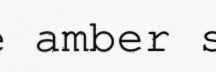
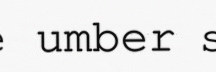
Rather than the kindest example, this page shows one chosen by a rule: a word replaced, which is the correction the tool exists for, on the scan condition whose word-replacement row is nearest the benchmark's overall figure; and, within that row, the page the benchmark's own evidence inspects, which is the accepted correction a detector found most easily. That gives office scanner, a word replaced, seed 73132: an invented letter, scanned under that condition (a flatbed scan saved as a JPEG, the commonest kind of scan there is), in which the word “amber” on the first line of the body becomes “umber”.
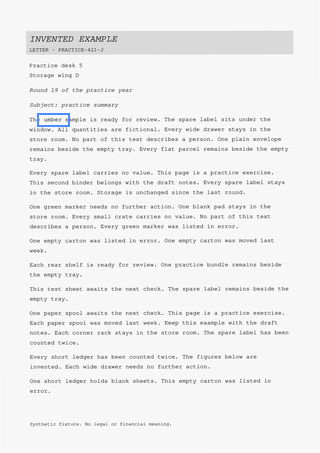
How it was made: Drawn. The page did not hold the ink the new word needs, so the letters were drawn to match the type beside them, with their blur, grain and ink colour taken from what surrounds the selection.
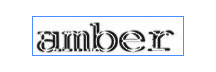
The crops below are the page's own pixels at 300 dots per inch, shown at eight times their size (four on a small screen) with each pixel a square and no smoothing; scroll sideways to see the whole line. Every pixel the correction changed is inside the outlined region in the third picture.
The check
4776 pixels changed, all of them inside the declared region, which runs from (336, 904) to (488, 944) on the 300 dots per inch grid; 0 changed outside it. Verified.
What the detectors found
Each detector's score on this page
| Detector | What it measures | Score |
|---|---|---|
| Recompression residue | how much each part of the page changes when it is saved again as a JPEG at several qualities | 0.945 |
| JPEG ghosts | the trace a second compression leaves in the residue curve | 0.774 |
| Quantisation history | whether the compression coefficients carry the page's own history or another | 0.972 |
| Compression grid | whether the block boundaries of the JPEG line up everywhere | 0.837 |
| Paper noise | whether the grain of blank paper is the same everywhere | 0.738 |
| Resampling traces | the periodic residue that scaling or rotating pixels leaves | 0.245 |
| Edge sharpness | how quickly ink turns to paper along strong edges | 0.784 |
| Copied blocks | blocks of pixels that appear twice on the page | 0.498 |
| Lighting | whether the paper's brightness follows one smooth light field | 0.726 |
| Black-and-white shapes | the sizes, shapes and run lengths of ink on a page with no grey | not applicable |
The strongest was quantisation history, at 0.972, and that is this page's FINDABILITY. Read plainly: our own detector drew a line around this correction. Similarity inside the changed box was 0.287, and the patch's sharpness against its ring 1.938, so the drawn letters read a little cleaner than the scan around them. The crops are above for you to judge.
The record, and a certificate
The corrected file carries its own record, an attachment named
provenance.json. For this correction it says: page
1, the region from (336, 904) to (488, 944) at
300 dots per inch, “amber” before and
“umber” after, made by drawn
letters, verified, with 4776 pixels
changed and 0 outside the declared
region, by engine version 0.1.1. The record names the file as a
corrected copy. It is a claim the file makes about itself; the service's own record is
the evidence, as How it works explains.
A verification certificate is a signed statement of the same measurements, issued on the Business plan for a corrected document, which anyone can check at the certificate check without an account. What a verification proves, field by field, is in the verification model.
No certificate has been issued for this correction: certificates are issued for corrections made on the live service, and this one was made in the benchmark. What one would hold is the measurement above, signed.
The letters were drawn with the fonts the service runs with, and no others, so that this example is the one the service would make; CECO PDF keeps this page to that by generating the example again, on the service's own font set, whenever the engine changes.
How to check these numbers
Everything on this page is generated from the benchmark's committed results, and the same data is served as JSON, so a program can read the numbers and compare them with the page. The benchmark, the detectors and the corpus builder are part of the engine's own code and its tests. The corpus is invented and generated from a seed: no real document, and no customer's document, is in it or ever will be.
The page is not updated by hand. When the benchmark is run again and its scoreboard published, this page is regenerated from it, and a test fails if the two disagree.
What these numbers do not say
They are measured on invented pages, not on customer documents, which never leave the service and are never used as test data. Four scan conditions and four kinds of correction are a regression set, not the world, and a number here is a property of that set on the day it was measured.
They are our own detectors' numbers. A document examiner with other tools, more time or a print of the page may find what these do not, and a low number here would not be a promise that a correction cannot be found. Today the numbers are not low.
A correction is never made to be hidden. Every one carries the attestation of the person who asked for it and a record inside the file, and the terms say who may alter a document: only someone entitled to alter it. These measurements are published so that the claim that nothing else on the page changed can be checked, and so that what the tool does is known, not guessed at.