Edit a PDF online
To edit a PDF online, open it in Edit PDF and lay text boxes, images, shapes, highlights or notes over its pages, or click a word and change it where it stands, in the same font, even on a scan. CECO PDF checks every change, and refuses to hide the page's words under a box.
Open a PDF to edit — it opens the tool, with nothing to install.
- What you can do: add text boxes, images, shapes, highlights and notes, each a real PDF annotation you can take off again, and crop a page.
- Existing text: a wrong word is changed where it stands, in its own font, and the page is checked so that nothing else changes.
- The price: Downloading costs nothing when all you did was add text boxes, images, shapes, highlights or notes, or crop, flatten or repair the file. Changing a word on the page is a correction, and downloads as a corrected document does. Correcting is free to try, 10 corrections a day. Until it is paid for, the corrected pages show with a watermark, unless you are signed in and have not yet taken your first corrected download of the day; the file you download does not carry it. One corrected document costs €0.99. One document can be bought without an account.
Your PDF is kept with your documents and deleted after 90 days, or whenever you delete it; the privacy notice says what is kept, and why. Edit only documents that are yours, or that you are entitled to alter: the terms say who may. Identity documents are refused when they are uploaded.
What can I edit here, and where does the rest go?
| What you want to do | Here | Where |
|---|---|---|
| Add a text box | Yes, in Helvetica, Times or Courier, any size and colour | Add text to PDF |
| Add an image, a shape, a freehand line or a note | Yes; an image is a PNG or a JPEG of up to 2 MB | Edit PDF |
| Highlight, underline or strike through words | Yes, on a page of real text, see-through so the words still read | Edit PDF |
| Crop a page | Yes: nothing is thrown away, so it can be undone | Crop PDF |
| Repair a damaged PDF | Yes: what could not be saved is listed | Repair PDF |
| Change a word that is already there | Yes, in place, in the page's own font | Edit PDF text |
| Change a word in a scan | Yes, in the scan's own picture | Edit a scanned PDF |
| Fill in a form, or sign it | Yes, with your own mark | Fill PDF, Sign PDF |
| Take private details out for good | Yes, taken out of the file, not covered | Redact PDF |
| Hide words under a white box | No: refused, as the words would stay in the file | Remove text from PDF |
How do I edit a PDF online?
- Open the PDF. Press the button above and choose your file.
- Choose what to add from the toolbar, such as “Add text”, “Add image”, “Highlight” or “Note”, then click or drag on the page where it goes, and set its words, size or colour.
- Press “Apply”. Everything waiting is laid over the page as one step, checked and recorded.
- Change a wrong word, if there is one. With no tool chosen, click the word, type it as it should be and press “Make this change”: it is set in the page's own font.
- Download. The button says, before you press it, whether the download costs nothing or takes a credit.
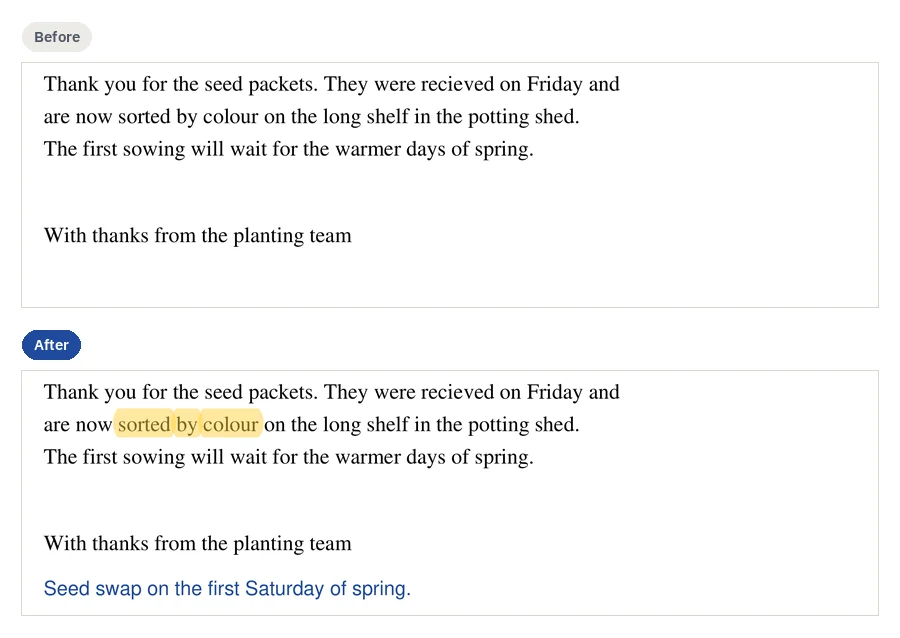
Can I change the text that is already there, not just add a box?
Yes, and this is where CECO PDF differs. The usual way round it in an online editor is to cover the wrong word with a white box and type a new one on top: the old word stays in the file under the box, and the new one rarely matches. Here, a click on a word is a correction. On a page of real text the new word is typed into the page's own text, in its own font; on a scan it is made from the page's own marks, or drawn to match the letters beside it. Then the page is drawn again, at 300 dots per inch for a scan and 150 for a page of real text, and compared pixel by pixel: the file can be downloaded only once nothing outside the corrected words has changed, and every correction is recorded inside the file.
Nor does the editor cover a word to stand in for a correction. A box that would hide words on the page is refused, with this advice: “To change the words, correct them: a correction changes them in place, in the same type, and is checked and recorded.” Editing the text in a PDF goes through it step by step.
Is it free to edit a PDF here?
Adding is: text boxes, images, shapes, highlights and notes cost nothing to download, and take nothing from the day's corrections. Changing a word is free to try, 10 corrections a day, and you see the result before you pay. Signed in, your first corrected download each day costs nothing; after it, one takes a credit or a plan. The pricing page lists the plans.
Can I edit a PDF on Windows, Android, Linux or a Chromebook?
Yes: CECO PDF runs in the browser of each. On a touch screen, “Place at page centre” puts an item on the page without a pointer. For a Mac, editing a PDF on a Mac sets it beside Preview; for an iPhone or iPad, editing a PDF on an iPhone or iPad sets it beside Markup; and for editing a PDF on Windows and on an Android phone, see their own pages.
Do I need to download a PDF editor app?
No: nothing is installed. The page is drawn and checked on CECO PDF's own server, so it needs a connection, and it does not work offline.
How does it compare with other online editors?
Each row is what the maker's own page said on the day beside it, and what that tool does better than CECO PDF:
| Tool | What its own page says | What it does better | Read on |
|---|---|---|---|
| Adobe Acrobat online1 | Adobe's free online editor “does not let you edit existing body text within a PDF”, and “signing in with a free Adobe account is required to download or share your edited files”. | Acrobat Pro, which “offers a 7-day free trial”, can “edit or reflow existing text, fix typos, or change fonts”. | 5 November 2026 |
| Smallpdf2 | “With a free account, you can add text, images, highlights, and drawings to your PDFs”; “Direct PDF text editing requires a Pro subscription”. | A whole scan made editable by OCR: “Once converted, you can directly edit the text using the PDF Editor.” | 5 November 2026 |
| iLovePDF3 | “Edit PDF by adding text, shapes, comments and highlights.” “Select text to edit, move, or delete the existing content.” | Moving existing content around the page | 5 November 2026 |
| Sejda4 | “Click existing text to edit or click the page to add new text”; “Changing existing text within scanned documents is not supported”. | Many changes at once: “Easily find and replace all occurrences of words in a PDF.” | 5 November 2026 |
| PDF245 | “Write on PDF pages, insert images, shapes and signatures”; for existing text, its tip is “Convert a PDF to Word to edit the text.” | Nothing to pay and no account: “No registration required” | 5 November 2026 |
| CECO PDF | Lays text boxes, images, shapes, highlights and notes over the page, and changes the words already there in place, in a scan too. | Changing a word in a scan in its own type, checked and recorded | From its own code |
What the others do better: more changes at once, find and replace, and, at PDF24, nothing to pay. CECO PDF changes one thing at a time and records each.
Where are my files kept, and for how long?
Under your account, until you delete them, and for 90 days at most. A text box's words go into the PDF; its record keeps only a fingerprint of them (a hash).
Questions people ask
How do I edit a PDF without Adobe Acrobat?
Open it here, in the browser; nothing from Adobe is needed. Editing a PDF without Acrobat sets the other ways side by side.
Can I edit a scanned PDF?
Yes. Text boxes, images, shapes and notes go over a scan as over any page, and a wrong word in the scan itself is corrected in its picture: editing a scanned PDF says how.
Can I remove a text box after adding it?
Yes. Until you press “Apply”, undo and redo work on what is waiting; afterwards each item can be taken off again, and undo takes back a whole step.
Will the rest of my PDF stay as it was?
Yes. What the editor adds sits above the page, whose own content is kept byte for byte; each step is refused if a pixel outside what was added changed. “Flatten” is the one step that writes into the page, and the record says so.
Can I highlight text in a PDF?
Yes, on a page of real text: “Highlight” marks the words you click or drag over, see-through, as a real annotation other readers show. A scan has no words to mark, so lay a see-through box over the line instead.
Why can't I edit my PDF?
If it asks for a password, open your own protected file with its password. If it carries a digital signature, it is refused: editing a signed PDF breaks the signature; correct it, then sign it again. A box refused over words would have hidden them: correct the words, or redact them.
Related pages
- Edit PDF text, to change words in the document's own font
- Add text to PDF, for a text box, its face, size and colour
- Redact PDF, to take private details out of the file for good
- Sign PDF, to place your own signature
- PDF editors compared, beside Acrobat, Foxit and other editors
Sources
Each page below was read on 5 November 2026, on its maker's own website; a number beside a quotation leads to its page. Check a price or a limit there before you rely on it.
- Adobe: Acrobat online: free PDF editor. www.adobe.com/acrobat/online/pdf-editor.html
- Smallpdf: Edit PDF. smallpdf.com/edit-pdf
- iLovePDF: Edit PDF. www.ilovepdf.com/edit-pdf
- Sejda: Online PDF editor. www.sejda.com/pdf-editor
- PDF24: Edit PDF. tools.pdf24.org/en/edit-pdf
Last updated