Change a date or a number in a PDF
To change a date or a number you typed wrong in your own PDF, select it and type the right one before you send it. CECO PDF sets it in the document's own font, checks the page and records the change inside the file. It refuses identity documents, and offers no way to change a PDF's creation date.
Open your PDF to fix a date — it opens the tool, with nothing to install.
- What it does: fixes a date you typed wrong in your own document, or corrects a figure in a document you wrote, before you send it, in the font the page uses.
- The check: the page is compared before and after, and the corrected file cannot be downloaded until nothing outside the corrected figures has changed.
- The price: Correcting is free to try, 10 corrections a day. Until it is paid for, the corrected pages show with a watermark, unless you are signed in and have not yet taken your first corrected download of the day; the file you download does not carry it. Signed in, your first corrected download each day costs nothing; after it, one takes a credit or a plan. One document costs €0.99, and a pack of 10 costs €4.99. One document can be bought without an account.
Your PDF is kept with your documents and deleted after 90 days, or whenever you delete it; the privacy notice says what is kept, and why. Correct only documents that are yours, or that you are entitled to alter: the terms say who may. Identity documents are refused when they are uploaded.
How do I fix a date I typed wrong in my own document?
- Open your PDF. Press the button above and choose the file.
- Click the date, or drag a box around it. Select only the part that is wrong if you like: a year typed wrong needs only the year.
- Type it as it should read, and press “Make this change”.
- Read the check. The result shows the date before and after, and the count of pixels changed outside it: outside 0 px, or no download.
- Download the corrected PDF, and send it.
A date that appears more than once, in the heading and again in the text, is fixed in each place. There is no replace-all, so each is its own correction, made where you point and checked on its own.
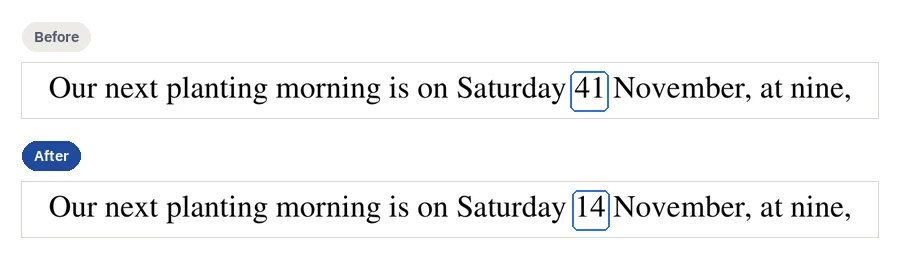
How do I correct a figure in a document I wrote?
The same way: select the figure and type it as it should be. On a page of real text the digits are set in the page's own font, and the rest of the line moves to fit a longer figure. On a scan the new digits are drawn to match the ones beside them, and a digit taken out, such as a zero too many, is removed by moving the rest of the figure across with the page's own marks.
Read the figure in the result before you download it. The check proves that nothing else on the page changed; it cannot know whether the new figure is the right one. That part is yours.
Will it match the rest of the page?
On a page of real text, the new figures are set in the font the PDF carries, and a character that font lacks is refused rather than set in another one. On a scan they are drawn in the typeface identified on that line, and the correction is refused when the face cannot be recognised or the drawn figures would come out sharper than the scan. Editing the text in a PDF explains how the font is found, and what the result says about each correction.
What can and cannot be changed here?
| What you want to do | Here |
|---|---|
| Fix a date you typed wrong in your own letter | Yes, in the page's own font, or drawn to match the figures beside it on a scan. |
| Correct a figure in a document you wrote, before you send it | Yes, checked like every correction. |
| Fix the same date in several places | Yes, one place at a time: there is no replace-all. |
| Change a PDF's creation or modified date | No. There is no way to do that here. A correction keeps the dates the file carries, and its own time goes into the record inside the file. |
| Change a document someone else issued to you | Not what this page is for: ask whoever issued it for a corrected copy. A page that carries marks of having been issued is flagged, with the clean route: a corrected re-issue rather than a retouch. |
| Change a date on an identity document | No. Identity documents are refused when they are uploaded. |
| Keep a digital signature valid after the change | No. Editing a signed PDF breaks the signature; correct it, then sign it again. |
| Change a date that a stamp or a fold crosses on a scan | No. The correction is refused, because the stamp would be cut. |
| Change a date without leaving a record | No. Every correction is recorded inside the file, with the text before and after. |
What does the record say?
Every correction is written into a record that travels inside the PDF, as an attachment named
provenance.json: where on the page it was made, how, the text before and after, and
when. The service keeps a record of its own, in which each entry carries the hash of the one
before, so a gap or a rewrite shows. And every correction carries your confirmation, in these
words: “I confirm I am authorised to alter this document. I understand that if it has already been issued or served, the appropriate route is a formal correction or a corrected re-issue, not a retouch. I accept responsibility for this change.”
So a date fixed here is a correction you made, on the record, to a document of your own. It is not a way to make a document say something it did not, and the terms close accounts that try.
Questions people ask
Will it show that I changed it?
Yes, in the record inside the file: each correction, with the text before and after, where on the page it was made and when. On the page itself, nothing outside the corrected figures changes, and that is what the check proves. On a scan, drawn figures are new ink, and someone comparing them closely with the rest of the page could tell.
Can I change a date in a PDF for free?
You can correct it and see the result before you pay: 10 corrections a day. Signed in, your first corrected download each day costs nothing; after it, one takes a credit or a plan. One document costs €0.99; the pricing page lists the rest. One document can be bought without an account.
Can I change a date on a scanned PDF?
Yes. The new figures are drawn to match the ones beside them, and a figure taken out is removed with the page's own marks. Editing a scanned PDF says what is refused on a scan, and why.
What if the new date is longer than the old one?
On a page of real text, the rest of the line moves along to fit it. A date that would run past the edge of its line is refused rather than squeezed in, because fitting it would move lines nobody edited. Shorten it, such as a month written as a number, or select the whole paragraph and accept that it is set again.
Can I change a date in a PDF that is signed?
Editing a signed PDF breaks the signature; correct it, then sign it again. If somebody else signed it, ask them for a corrected copy, signed again.
Can I change a date in a PDF form?
A date typed into one of a form's own fields is the field's answer, not the page's text: change it with Fill & sign, where your answer replaces the one the field holds.
Can I undo it?
Yes. Undo takes the correction back, and counts as half a correction against the day's allowance.
Related pages
- Edit PDF text, for any other word you typed wrong
- Edit a scanned PDF, when the page is a scan
- Remove text from PDF, to take out a line left over from a draft
- Fill PDF, for the answers in a form's fields
- How it works, for how one correction is made and checked
- Compare PDF, to see what changed between two versions
Last updated